Your side of it
The private part you work from: your clients, the businesses you're reaching out to, and the payments coming in — on your laptop or on your phone while you're waiting at pickup.
For moms at home
You buy the software once, you own it forever, and you build websites for local businesses from your kitchen table — and they pay you for them. Nap times, school hours, after bedtime — the work waits for you, not the other way round.
One payment. You own the software forever. No subscription to us, and a 7-day refund if it isn’t what this page said.
Your week, not theirs.
The whole job, start to finish, in gaps you already have.
Nap time
About 40 minutes
Find the businesses. Paste ten Google Maps listings into the leads board. The software fills in their details for you.
School hours
A longer stretch
Build the thing you're selling. A client's site, from a template, then send them the preview link.
After bedtime
Twenty quiet minutes
Ask for the yes. Send the follow-ups, using the wording from the script pack.
They say yes — you invoice them.
Your own Stripe account, paying into your own bank. We never touch the money and we don’t take a cut. You set the price, and the pricing guide has worked examples to copy.
How much you charge, and how many clients you take on, is yours to decide.
$199 once
No subscription to us, now or later. The software is yours.
Not an MLM
Nothing to recruit, no downline, nobody under you, no starter kit.
7-day refund
No questions, no form, no call. Refunded the way you paid.
So what is it, plainly?
A plumber, a salon, a landscaper, a dog groomer — most of them either have nothing or have something that looks like it was made in 2011. You build them a proper one, you charge for it, and you can charge a small amount every month to keep it running. LeadPoint is the software that does the building, plus the guides that tell you how to find those businesses and what to say to them.
Setup
PDFUp and running in one sitting
Playbook
PDFYour first paying client
Scripts
PDFThe exact words that close
Pricing
PDFWhat to charge
Go-live
PDFTake a client live in an afternoon
Who to ask
PDFThe Local Client Goldmine
Other platform
PDFReselling on GoHighLevel
Every one of these comes with it — setting up, reaching out, what to charge, getting a site live, and who’s worth approaching.
It fits in the gaps you already have
None of this needs an uninterrupted stretch. The work is genuinely made of small pieces, and the software is what makes the pieces small — you're not learning design or writing code in any of these windows.
Nap time
About 40 minutes
Find the businesses. Paste ten Google Maps listings into the leads board. The software fills in their details for you.
School hours
A longer stretch
Build the thing you're selling. A client's site, from a template, then send them the preview link.
After bedtime
Twenty quiet minutes
Ask for the yes. Send the follow-ups, using the wording from the script pack.
Those three add up to one thing: a local business with a site they’re happy with, and an invoice from you. You set the price and the payment goes straight to your own Stripe account.
What it doesn't cost you
The reason going back to work so often isn't worth it is that the job takes the money back before it reaches you. This is a different shape of thing, and it's worth being precise about why.
The only things you spend are $199, once, and hours you choose. What you charge a client, and what that adds up to, is genuinely up to you — and anyone who quotes you a figure for it is guessing.
More than the money
This part is harder to put on a sales page than the money is, and for a lot of people it's the actual reason. Not a side thing you help with. A business, with your name on it, that is yours.
Everything you get
Four pieces of software and a shelf of guides. These are real screenshots — tap any of them to see it full size.
The private part you work from: your clients, the businesses you're reaching out to, and the payments coming in — on your laptop or on your phone while you're waiting at pickup.
A finished website with a simple editor of its own, so your client can change their own opening hours or swap a photo without ringing you on a Saturday.
If you ever pick up the phone, this shows you when it's legal to call in each state. Getting that wrong carries a real fine, and this turns it into a non-question.
You're not left to work it out on your own. A day-by-day plan for your first week, the exact words to use when you reach out, what to charge, how to get a site live, and which local businesses are actually worth approaching.
Setup
PDFUp and running in one sitting
Playbook
PDFYour first paying client
Scripts
PDFThe exact words that close
Pricing
PDFWhat to charge
Go-live
PDFTake a client live in an afternoon
Who to ask
PDFThe Local Client Goldmine
Other platform
PDFReselling on GoHighLevel
Every one of these comes with it — setting up, reaching out, what to charge, getting a site live, and who’s worth approaching.
Every single thing that’s included
The bit everyone worries about
I've never built a website before. Can I really do this?
Yes — that's the whole point. The system already works. You're not learning how to build a website from scratch; you're picking a template and filling in a business name and color. Building a client site really is a few clicks once you're set up.
Do I need to know how to code?
Not to run it — once it's set up on your own accounts that's all sign in and click buttons, and building a client site is a few clicks. Setup is the one technical part, and I won't pretend otherwise: it's a single session where you install a couple of free tools, create your accounts (Stripe, hosting, GitHub), and copy-paste some keys into a settings file. You're following exact steps, not writing code — but you will be using a terminal for a few commands. Budget about an hour the first time. There's a written walkthrough for every step, an AI shortcut if you get stuck, and the Discord if you're still stuck. After that you never touch it again.
What if a client wants something custom — like a booking calendar or a menu?
If it's small (different colors, more sections, custom photos) — you can do it through the editor. If it's bigger (custom features, third-party integrations) — that's where you'd post in the Discord and ask for help, or charge more for that one client. Members regularly help each other with custom asks.
Real messages

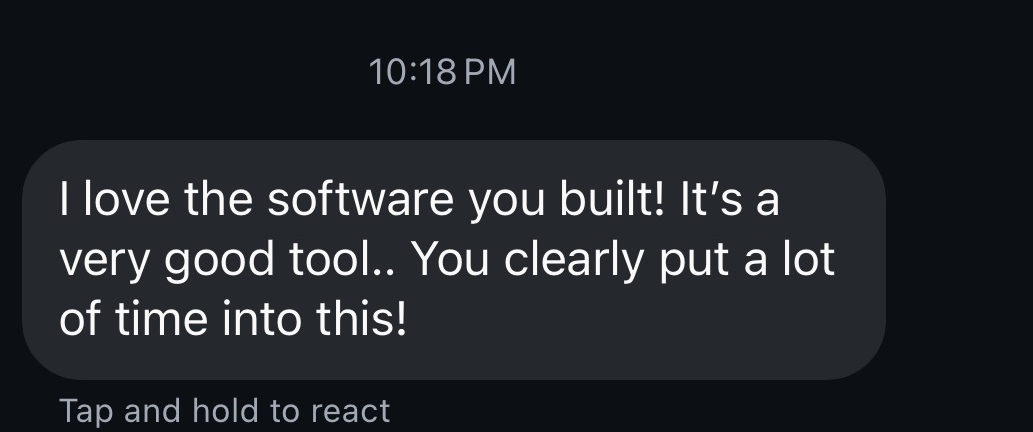


A real client, minutes after they were sent their new site — unprompted.
These are messages from real people running LeadPoint, and one from a real client of theirs. We haven’t said any of them is a mom or a student, because we don’t know that and we’re not going to imply it. They’re here because they’re about the software you’d be buying.
Everything above, one payment
The price moves to $399once the early-bird spots are gone. There is no countdown on this page and no fake deadline — when it changes, it changes.
Pay in 4 with Klarna, every 2 weeks — or choose Affirm at checkout for monthly payments. You get everything the moment you order. Subject to approval; Affirm terms vary.
Pay $199 today, or split it into 4 payments of $49.75 — interest-free, every 2 weeks.
Think about it:
Instead of paying everything today, you spread the cost over time while enjoying your purchase right away.
Delivered as a download you set up on your own accounts — the setup guide walks it, and it takes about an hour. The 7-day guarantee is here.
If it isn't what this page said
This is a promise that the product is what we described — not a promise about what you'll earn, which is not a thing anyone can honestly guarantee.
Email hello@leadpointweb.com within 7days and that’s the whole process.
That this is passive. It isn’t. You have to contact local businesses and ask them for money, and most of them will not reply. That part is the job, and no software removes it.
That you’ll make a particular amount. Nobody can tell you that — not us, not anyone — and the people who do put a number on it are selling you something other than what they said they were.
That it’s quick. Your first client is real work, and it takes as long as it takes.
What I can tell you is exactly what’s in the box, that you own it outright with nothing further to pay us, and that you can have your money back inside 7days if it isn’t what this page said it was.
Questions
Software, plus the guides that tell you how to use it — bought once, downloaded, and run on your own accounts. On the software side: the dashboard you work from, the builder that makes the actual websites out of ready-made designs, and a tool that tells you when it's legal to call a business in each state. On the guides side: a plan for your first week, the words to use when you reach out, what to charge, how to get a site live, and which local businesses are worth approaching. There's also a private group where you can ask questions. You own all of it, and there is no monthly fee to us.
No. There is nobody above you and there will be nobody below you. You are not recruiting anyone, there is no team to build, no monthly volume to hit, and no starter kit. You buy a piece of software once, and then you sell your own work to your own clients and keep all of it. If it helps: there is no way for you to earn anything from anyone else buying this.
Then it falls apart for a month. Nothing expires, there is no subscription ticking, and nobody is waiting on you. The software is yours whether you open it or not — that is the practical difference between owning a tool and renting a platform. Pick it back up when the house is calmer.
That depends entirely on your state and sometimes your city, so please check locally rather than taking our word for it — plenty of people start as a sole proprietor under their own name and register later once there's income to justify it. What we can tell you is that nothing in the software requires one to work.
Whatever you decide — you set your own prices and every payment goes straight to your own Stripe account. The usual structure is a one-time fee to build the site plus a smaller amount each month to host and look after it, and there's a pricing template included that lays that out with worked examples you can copy. What those numbers should be depends on your area and who you're selling to, and anyone who quotes you a figure without knowing either is guessing.
Not if you don't want to. The script pack covers calls, but it also covers text, email and Instagram or Facebook DMs, and the leads board is built to work by channel so you can stay entirely in writing if that suits your day better. Messaging while a toddler naps is quieter than a call anyway.
Yes — that's the whole point. The system already works. You're not learning how to build a website from scratch; you're picking a template and filling in a business name and color. Building a client site really is a few clicks once you're set up.
Not to run it — once it's set up on your own accounts that's all sign in and click buttons, and building a client site is a few clicks. Setup is the one technical part, and I won't pretend otherwise: it's a single session where you install a couple of free tools, create your accounts (Stripe, hosting, GitHub), and copy-paste some keys into a settings file. You're following exact steps, not writing code — but you will be using a terminal for a few commands. Budget about an hour the first time. There's a written walkthrough for every step, an AI shortcut if you get stuck, and the Discord if you're still stuck. After that you never touch it again.
Enough to do consistent outreach — most people who do 1–2 hrs/day land a conversation in the first few days, and client one typically follows inside the first two weeks. Building the actual sites takes minutes, so almost all of your time goes into reaching out to businesses, not building. Do the work and it moves fast; do nothing and nothing happens.
The software does the finding. The built-in lead tool surfaces local businesses near you with no website — or a bad one — pulls their details in from their Google listing, and shows you only the ones it's legal to call right this minute. From there the included scripts tell you exactly what to say on a call, text, email or DM. What we don't sell is a bought contact list — that's a different business, and the people who do it well already do it. The Discord adds what's working right now: walking into shops with a printed mockup, partnering with marketers who don't build sites, posting before/after redesigns. Members who work it daily typically land client one in the first two weeks; nearly everyone who sticks with it is there inside a month.
Just Stripe's ~3% fee on what your clients pay YOU. Hosting runs on free tiers to start, and a domain name (~$12/year) per client is your client's responsibility, not yours. Checkout is secure via Stripe — a one-time price, no hidden rebills. No other fees to us after your one-time $199.
Two places: (1) The step-by-step setup guide covers the common snags. (2) The Discord — an active community and a support channel where you can post a screenshot of what's broken and get an answer.
No. Secure checkout via Stripe — a one-time price, no hidden rebills to us. You pay $199 once and own the software forever. If you split it with Klarna or Affirm, those instalments are your arrangement with them and they end when it's paid off — nothing recurring from us either way. The only ongoing costs are optional things you choose for your business (like hosting tiers as you grow, or Stripe's fee when clients pay you).
You get 7 days to decide it's not for you. Buy it, download it, and go through everything — dashboard, templates, playbooks, scripts. If it isn't what you expected, email me inside 7 days and I'll refund every cent, no questions asked and no explanation needed. After that it's yours forever. What I won't pretend is that the outcome is guaranteed: whether you land clients depends on how much outreach you actually do, and no refund policy can do that part for you.
Or read the full breakdown of the software.